Pages

Showing posts with label UI. Show all posts

Tuesday, February 2, 2010

Lots of toolbars

While doing some research for the toolbar in Blender 2.5 I collected a bucketload of toolbars from various apps to determine what would be useful for Blender.

Along the top are various horizontal toolbars, while the vertical ones are beneath. The challenge is to have something that is clear, compact and fast. Traditional painting apps work well with icons, because the concepts map to real world items quite well. This isn't always the case in 3D though, because the tools are more abstract - there's not really such a thing as a real world extrude tool, at least not something that's be useful as an icon. 

Although what we have in 2.5 is already quite nice, it's interesting to look at different ways of displaying tools in a GUI. It might be nice to eventually have horizontal tools too, for example. 

Until then, this is some food for thought.

Presets menu

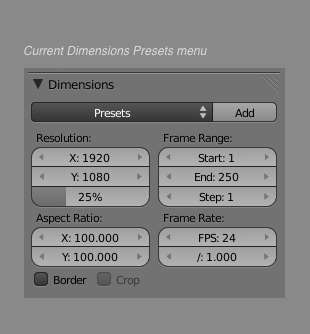
One of nice small new features in Blender 2.5 is the new unified presets system. There's now a built in way to easily add presents to any area of Blender, to set an array of controls. This is currently used a few places for dimensions, for subsurface scattering presets, but has great potential for use in things like physics too. Smoke presets, soft body presets anyone?

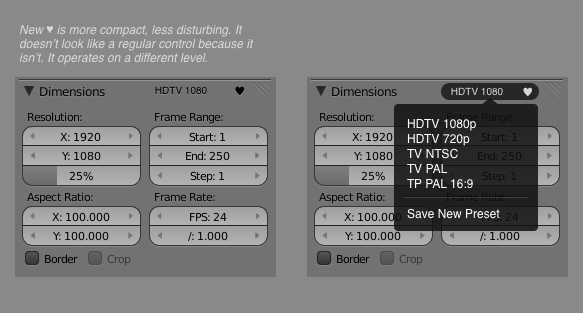
As nice as this is, the UI for this feature leaves a little to be desired. It's rather huge, and it also looks like all the regular other controls, when in fact it operates on a different level. It's for setting the regular controls. Below I've come up with a smaller, less intrusive version of this piece of UI that is also distinguished from other controls.

Update: Some commenters pointed out that it might be useful to display the currently selected preset. In the current 2.5 version, this information isn't visible, despite the large amount of space it takes up. Here's a version that incorporates that.